 ·
3 minute read
·
3 minute read
The Brief: Dell has introduced expanded capabilities for ThinOS 10, its thin client operating system designed for virtual desktop infrastructure (VDI) and Desktop-as-a-Service (DaaS) environments.
The latest release broadens device compatibility, allowing organizations to install ThinOS on a wider range of new and existing Dell and non-Dell PCs and thin clients. This enables IT teams to repurpose hardware instead of replacing it, extending device lifecycles while maintaining secure access to virtual workspaces.
ThinOS 10 also integrates with Wyse Management Suite, providing centralized management that helps administrators configure, deploy, and maintain endpoint environments at scale. Dell states that the operating system maintains a closed architecture designed to limit attack surfaces while supporting modern browser options and a broader application ecosystem.
Explore full details of the announcement about Dell ThinOS 10 at dell.com.
 Source: Dell
Dell Expands Device Support with ThinOS 10 for Secure VDI Endpoints
Analyst Perspective: Dell ThinOS 10 continues to improve thin client software used to access virtual desktops and cloud workspaces. The platform reinforces the idea that endpoints do not always need the capabilities of traditional desktop operating systems when most applications and workloads reside in centralized environments.
This design approach can simplify device operations. Thin client systems focus primarily on secure access to virtual sessions rather than managing complex local software environments. As a result, organizations can reduce the number of variables that affect endpoint performance and stability.
ThinOS 10 also illustrates how endpoint software continues to evolve alongside virtual workspace technologies. As VDI and DaaS platforms mature, endpoint operating systems must maintain compatibility with evolving access methods and user expectations. ThinOS aims to support that shift through a platform that prioritizes stability, streamlined operation, and controlled device functionality.
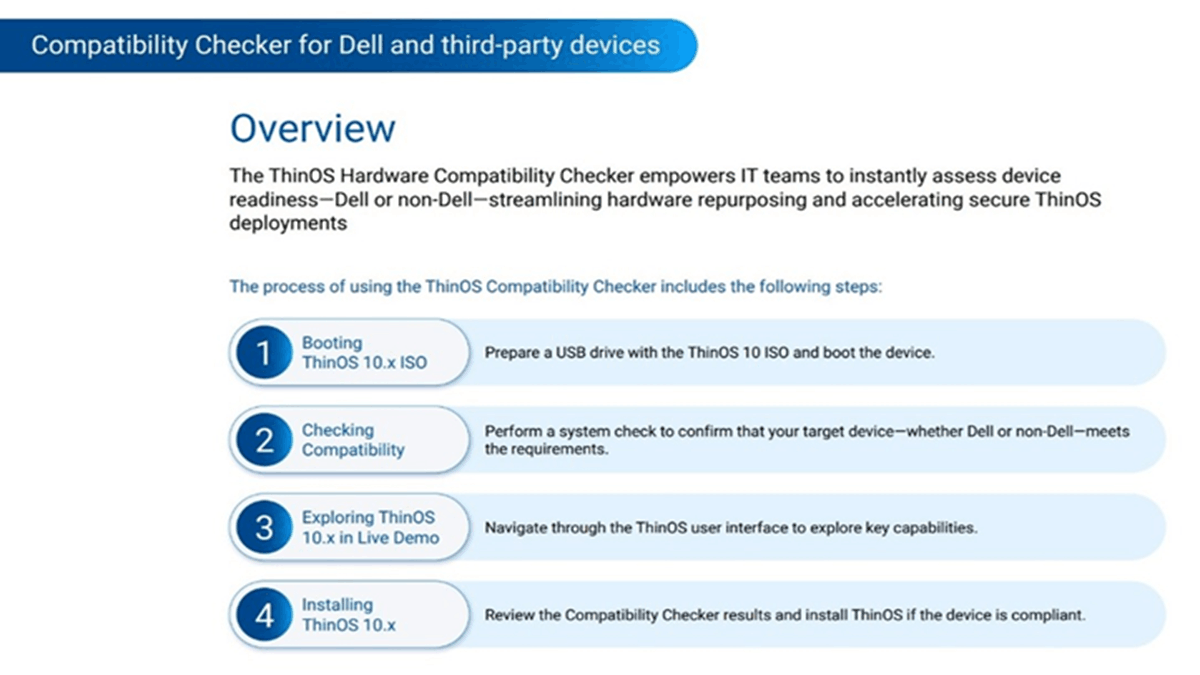 Source: Dell
Expanded Device Compatibility Enables Wider ThinOS Deployment
ThinOS 10 introduces expanded compatibility across a broader range of endpoint devices, including both Dell and non-Dell hardware.
This change allows organizations to install the operating system on many existing PCs and thin clients rather than limiting deployment to dedicated thin client devices. By supporting more device types, the platform becomes accessible to organizations operating mixed hardware fleets across different locations.
The expanded compatibility also simplifies standardization efforts in environments where multiple device vendors are present. Instead of managing separate endpoint platforms, IT teams can unify endpoints under a single thin client operating system designed for virtual computing.
This approach helps organizations align legacy hardware with modern virtual desktop environments. Systems that meet minimum requirements can be converted into thin clients, enabling continued use while supporting secure connections to centralized workloads hosted through VDI or DaaS platforms.
Repurposing Hardware Supports Cost Control and Sustainability
The ability to convert existing PCs into thin client endpoints changes how organizations approach hardware lifecycle management.
IT departments can extend the usable lifespan of aging devices through software conversion, allowing existing hardware to remain productive within virtual desktop environments. This method allows companies to maintain productivity while avoiding premature hardware refresh cycles.
Extending endpoint lifespans can help organizations manage IT spending more effectively. More flexible refresh cycles allow companies to delay large procurement efforts during periods of economic uncertainty or rising hardware costs.
Moreover, sustainability goals influence endpoint strategies. Repurposing existing hardware reduces electronic waste and supports circular practices that emphasize longer device lifespans. Converting compatible systems into thin clients allows organizations to keep current hardware in use while maintaining secure access to virtual workspaces.
Centralized Management and Security Design for Regulated Environments
ThinOS includes management capabilities integrated with Wyse Management Suite, which enables administrators to control configuration, deployment, and updates across endpoint fleets.
Centralized management allows IT teams to enforce policies and apply updates across distributed environments without requiring direct interaction with each device. This centralized model can simplify operations in organizations managing large numbers of endpoints across multiple locations.
Devices converted to ThinOS can automatically enroll into management systems, allowing configuration policies and application settings to be applied consistently across the environment.
Security remains a core design element of the operating system. ThinOS uses a closed architecture intended to reduce the attack surface commonly associated with general-purpose operating systems. This structure helps support environments that operate under strict security and compliance requirements, including sectors such as healthcare, financial services, and government agencies.
Extending Endpoint Value in Virtual Workspace Strategies
Dell’s ThinOS platform has long been positioned within its broader endpoint computing portfolio, particularly alongside thin client hardware and virtual workspace solutions.
Expanding ThinOS 10 compatibility across existing devices reinforces this strategy, allowing organizations to align legacy hardware with modern VDI or DaaS infrastructures. Instead of requiring specialized endpoint hardware for every deployment, the platform enables IT teams to adapt their current device inventories to support virtual workspaces.
Organizations managing distributed workforces or regulated environments may find particular value in this approach. Secure, centrally managed endpoints remain important in sectors where application access must remain controlled and consistent. Integrating these capabilities with Dell’s existing endpoint management ecosystem strengthens the overall virtual workspace architecture.
However, device repurposing can introduce compatibility considerations, especially when organizations operate highly diverse hardware fleets. Moreover, performance limitations may appear on older devices that barely meet minimum requirements. So careful hardware validation and pilot testing can help identify these issues before large-scale deployment.
It’s important to note that endpoint virtualization continues to evolve as hybrid work models expand. Platforms that extend hardware longevity while maintaining strong security controls may gain wider adoption across enterprise IT strategies. ThinOS 10 reflects this direction, positioning repurposed endpoints as a viable component of modern virtual computing environments.
Keep up with the technologies transforming collaboration and communication. Subscribe to our newsletter for thoughtful analysis and insights you can apply.