 ·
3 minute read
·
3 minute read
The Brief: Google announced Connect Room, an upcoming capability designed to simplify how users start meetings on Google Meet hardware.
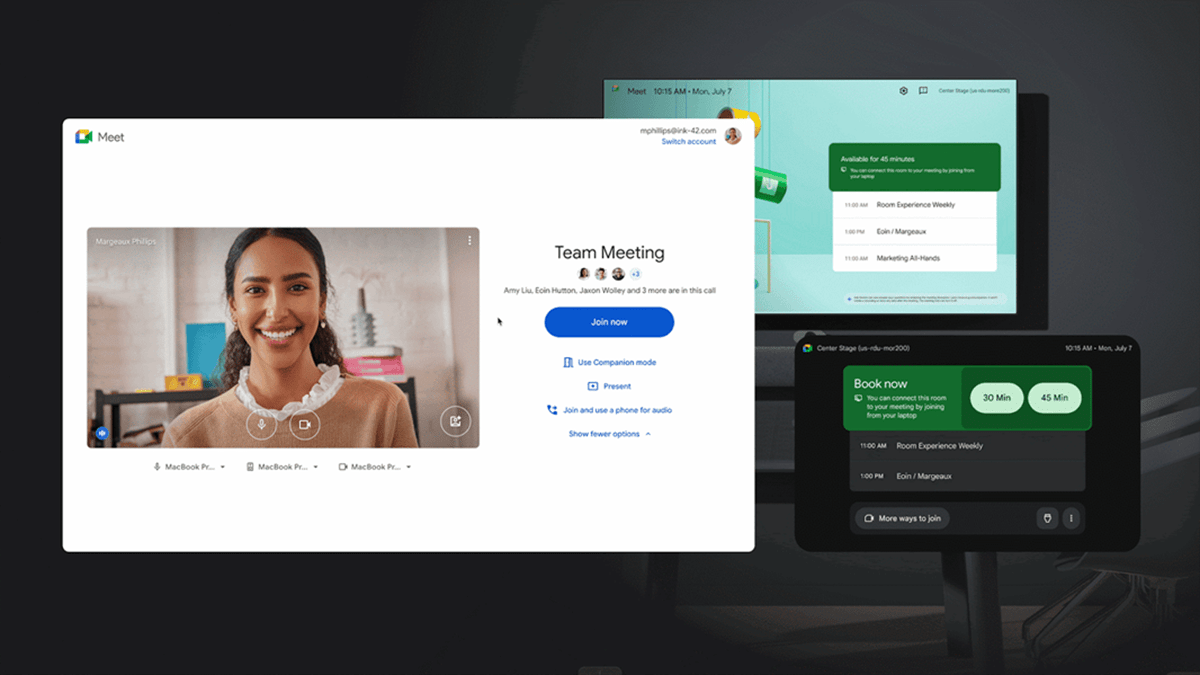
Arriving first in early preview, the feature detects nearby Google Meet hardware via ultrasound and provides a one-click option to start meetings directly from a personal device. When activated, the room hardware launches the meeting while the user’s laptop shifts into Companion mode and automatically checks them into the room. The update also enables immediate use of unoccupied booked rooms, quick booking of available rooms, and easier joining of private or unlisted meeting links.
The rollout begins December 2, 2025, for Rapid Release domains with devices enrolled in the Early Preview Rooms program.
Discover full details of the announcement about Connect Room at workspaceupdates.googleblog.com.
 Source: Google
Google Meet Unveils Connect Room for Seamless Meeting Launch
Analyst Perspective: Google’s Connect Room feature offers a direct answer to the everyday complications that slow down meeting spaces.
Teams often lose time to code entry, mismatched calendars, or hardware that needs a moment to catch up. With proximity-based detection, Google removes several of those friction points and helps meetings begin with more consistency. The experience becomes less about troubleshooting and more about getting the discussion underway.
This update also highlights Google’s focus on tighter connections across its hardware and Workspace services. The shift into Companion mode happens with fewer steps, creating a more natural handoff between personal devices and room systems.
For organizations relying heavily on Google Meet hardware, that continuity is becoming increasingly important. As hybrid work norms mature, automated room access and smoother meeting starts will continue to move toward baseline expectations rather than optional enhancements.
Streamlined Room Activation
This update offers a more direct method to activate Google Meet hardware without using meeting codes or navigating room calendars.
When a laptop opens the Meet green room, the system checks for available devices in range and presents a one-click action to start the meeting in the room. The resulting workflow reduces the interruptions commonly encountered in shared meeting spaces, especially during back-to-back sessions.
As soon as the user selects the prompt, the hardware takes over and the laptop shifts into Companion mode, supporting a smoother transition into collaborative activity. The capability is designed to enhance efficiency for individuals entering rooms that have not yet launched a scheduled meeting.
Automatic Room Booking and Takeover
Connect Room also enables automatic room booking when the hardware joins a meeting initiated from a personal device. This allows users to enter unoccupied reserved rooms and immediately begin their sessions without waiting for the next scheduled occupant.
For open rooms, the system books the space instantly, ensuring the room is recorded as in use for the duration of the meeting. These adjustments support organizations managing high-demand conference spaces, where availability changes quickly.
With booking and device activation happening together, users don’t have to wonder what to do next—everything simply clicks into place as they enter or switch rooms.
Flexible Entry for Private and Unlisted Meetings
This feature provides a direct path into meetings regardless of how the invitation was shared or scheduled.
Users can launch hardware participation for private meetings tied to their personal calendar, sessions listed on organizational calendars, or invitations shared informally through email or chat. This allows Connect Room to bridge gaps between structured scheduling and spontaneous collaboration.
Private meetings benefit from quick transitions into room hardware without exposing details on shared calendars. Calendar-listed sessions still follow standard workflows but gain the added speed of one-click activation. Unlisted or ad-hoc invitations, often used for small group discussions or sensitive topics, can start immediately without relying on room calendar data.
These capabilities make it easier to walk into any meeting scenario and get started on Google Meet hardware without the usual hurdles.
Evolving the Google Meet Hardware Experience
With Connect Room, Google adds another layer of ease to its collaboration ecosystem. The feature plugs neatly into existing Meet hardware and room-booking workflows, cutting down on slow join experiences and room-availability confusion.
Instead of wondering who booked the space or fumbling with codes, users can start sessions more confidently and move through their day with fewer disruptions. This is especially helpful in offices packed with back-to-back meetings or hybrid teams that frequently switch between laptops and room devices.
There may still be a few wrinkles, especially in setups where hardware varies across locations or proximity detection needs calibration. These are manageable challenges—admins can standardize configurations, enable detection settings, and guide users through short onboarding steps. Once those pieces are aligned, the system becomes far more predictable.
As Google broadens access, the feature could become an essential part of its room-technology portfolio, supporting a future where meeting rooms respond smoothly and automatically to the people who use them.
Get expert analysis and industry updates designed for leaders shaping the future of workplace collaboration. Subscribe to our newsletter today and stay one step ahead.