 ·
3 minute read
·
3 minute read
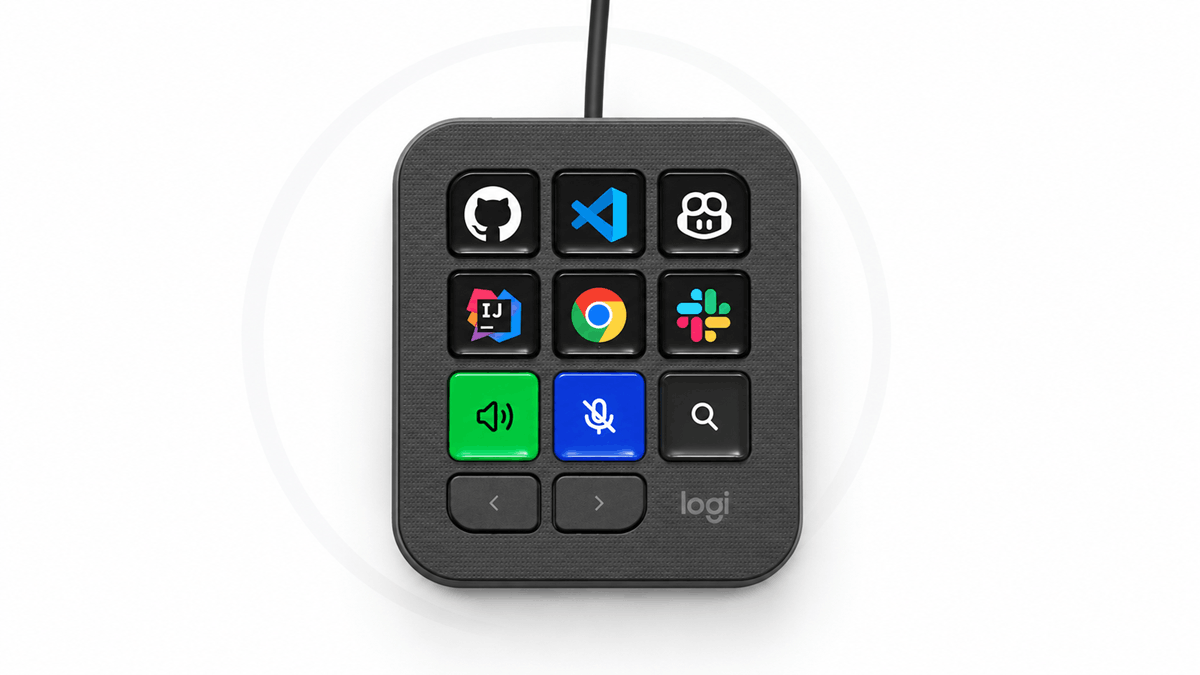
The Brief: Logitech has introduced MX Keypad, a customizable control interface for developers working across AI coding tools and IDEs.
The device supports GitHub Copilot, Claude Code, VS Code, and IntelliJ IDEA, with programmable keys that can control one or multiple applications and agents. It includes plugins for GitHub Copilot and Claude Code, while community-created plugins for Claude Code and OpenAI Codex are available through the Logi Marketplace.
Logitech developed the product with input from GitHub and the MX Collective community, and each unit includes three months of GitHub Copilot Pro+, redeemable through Logi Options+. MX Keypad uses recycled plastic and FSC-certified paper packaging.
The MX Keypad became available in markets on September 8, 2026, in Graphite and Pale Grey, priced at $99.99 or €99.99.
See full details of the announcement about the Logitech MX Keypad at news.logitech.com.
 Source: Logitech
Logitech MX Keypad Launches for AI-Powered Coding Workflows
Analyst Perspective: MX Keypad extends Logitech’s MX philosophy into developer workflows shaped by AI-assisted coding. The important change is not another input device alone, but it assigns physical controls to software actions developers already use. That gives Logitech a way to connect its hardware expertise with work increasingly mediated by commands, agents, and reusable prompts.
The product also gives Logitech a developer-oriented component within its software ecosystem. Logi Options+ handles configuration, while the Logi Actions SDK allows engineers to create integrations. This gives the hardware a software component that can evolve as developers create new uses. Community plugins for Claude Code and OpenAI Codex reinforce that model.
Another thing is that the Native GitHub integration at launch directly connects MX Keypad to an established developer platform, while the included Copilot Pro+ subscription makes the device immediately relevant to Copilot users.
Logitech is connecting hardware, configuration software and AI coding services in one offering.
 Source: Logitech
Programmable Controls Span Coding Tools
MX Keypad supports multi-application control, which means developers can assign keys to actions spanning GitHub Copilot, Claude Code, VS Code, and IntelliJ IDEA. The device can execute prompt macros, refactor code, and launch commands, making the hardware applicable to tasks that require switching between applications or entering commands.
A single key can control applications and agents, so developers can configure controls around the combinations they use most, instead of relying on a fixed command set. Plugins for GitHub Copilot and Claude Code are included, providing functionality for these tools at launch.
Moreover, MX Keypad functions as a physical interface across multiple elements of a coding workflow to give developers consistent controls while they work across different environments, applications, and AI agents.
GitHub Integration Anchors the Developer Ecosystem
Since GitHub is integrated into MX Keypad from launch, the device includes native support for VS Code and the GitHub Copilot app. The collaboration also includes three months of GitHub Copilot Pro+, redeemable through Logi Options+, so it gives the product a connection to an AI coding service at purchase.
Logitech is not limiting the device to GitHub software. Support for Claude Code and community plugins for OpenAI Codex give developers ways to connect agents with controls. The Logi Marketplace hosts these integrations, while the Logi Actions SDK gives developers means to create tools.
This lets Logitech hardware interact with several coding services. For developers who use agents or environments, the ability to configure controls across them can make MX Keypad part of a desktop setup.
Recycled Materials and Launch Details
MX Keypad carries a sustainability specification in its hardware: Graphite models use 64% certified post-consumer recycled plastic, and the Pale Grey models use 49%. Also, Logitech uses paper packaging sourced from FSC-certified forests and other controlled sources.
The keypad costs $99.99 USD or €99.99, and each purchase includes three months of GitHub Copilot Pro+, which gives developers both the customizable hardware and access to an AI coding service. It became available in select markets through Logitech.com on September 8, 2026.
Logitech combines customizable controls, developer-focused software integrations, and recycled materials in the device, giving developers several factors to weigh when deciding how well it fits their existing coding workflows.
From MX Hardware to AI-Assisted Developer Workflows
MX Keypad extends Logitech’s MX portfolio into a developer audience while retaining its emphasis on customizable computer input. Programmable hardware, Logi Options+, the Logi Actions SDK and marketplace integrations give Logitech tools for AI-assisted work.
The main need is managing commands across coding tools, so developers using GitHub Copilot, Claude Code, VS Code or IntelliJ IDEA are the audience.
Where Adoption May Need Support
The main hurdle is configuration: users may need time to create layouts and integrations. Logitech can reduce that effort through default profiles, clear documentation and community plugins. Compatibility will matter as coding services change their interfaces, making plugin maintenance important.
How MX Keypad Could Evolve
MX Keypad gives Logitech an entry into AI-assisted developer workflows that complements its established hardware portfolio.
Its longer-term value could grow as more integrations become available through the Logi Actions SDK and Logi Marketplace. And a larger library of developer-created tools could make the device useful across an increasingly varied range of coding environments and AI agents.
Make confident decisions with research and advisory built for technology providers. Contact us at the Collab Collective to see how tailored insights can guide your next strategy.